Gemini CLI, are you there?
You may be wondering why I am and will be writing about Gemini/Google AI products. Well, because I’m cheap 💸.
I recently bought a new Pixel and was given a year subscription to the Google One AI Pro plan. Since it gives access to all the Google AI features for free, I figured I’d give it a shot (Don’t worry Claude, I still use you at work) and see what is possible.
Thus, everything I write about here will likely be related to Google products, with maybe some special exceptions. Who knows 🤷.
Gemini CLI has been my primary tool for usage in my side projects. I have access to Code Assist in my VS Code IDE, but honestly, I don’t use it that much. I’m trying to explore this non-IDE world I see coming as much as possible.
Unsurprisingly, or maybe surprisingly, this tool has been all over the place. I do think the v3 models are massive improvements, but it still has it’s ups and downs.
The Goods
Skills
Gemini CLI is surprisingly good at picking up skills when compared to other platforms I’ve used. It’s ability to understand what I’m trying to do and relate it to a skill makes it so I forget that I actually setup skills previously (or that my custom skill is different from a built-in skill).
This is a recent change, with the v3 models being better than the v2 models.
Plan Mode (finally)
FUCKING FINALLY they added plan mode to Gemini CLI. I can now change to it just like Claude Code and it will go through and figure out what I’m trying to do and generate a plan. Then I can implement this plan.
It’s such a step up from the “Hey, research this topic and create a plan. DO NOT MODIFY FILES” prompt I had been using prior. I just wish that there was a checklist it would use to convey progress.
Continuous Improvement
I can tell the team working on the CLI tool is working hard to improve things. There are a lot of updates to the tool, but mostly it just gets better and better. I mean, it should be getting better and better because it was so far behind the curve when compared to other coding CLI tools.
I do really appreciate all new features and the documentation is actually pretty good, which is kind of surprising for Google (shots fired).
The Bads
Off the Rails (sometimes)
Sometimes Gemini goes down rabbit holes, like bad, and no matter how much you try to get it back the only thing you can do is stop and restart it again. Yes, we’re talking about context management.
Honestly, context management with this thing was/is difficult. IIRC the /compress command didn’t exist for a while or it
did but didn’t work…
This was further confused when looking online. Some said it has a rotating context window. Others said differently. And it goes on and on.
I still sometimes default to using /clear or restarting over /compress, even when i’m working on the same thing between
sessions. If I’m doing this, and I want to easily get context back in the next session, I’ll have gemini manually write
out what we’ve been doing. Honestly, I should create a command for this…
Access
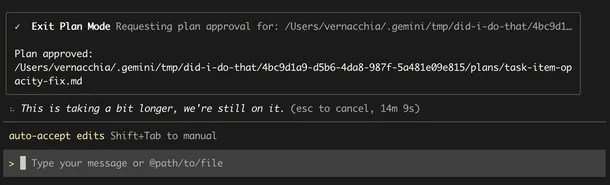
Getting access to Gemini during some periods is really hard. As I type this, my plan for a small tweak I want to make is on 10 minutes of thinking. This is also the second time I’ve stopped it and tried to restart it.
This is bad… As a paying customer I’d expect access to the tool I pay for. Luckily, I did get it for free, but if I wasn’t, I’d be flaming pissed and likely have cancelled already.
When I tried this with GasTown, even doing small things ran into the limits and I’d get 429s.
Like c’mon… get with it.
Update: Like WTF is this?!?! I accepted the plan and now we’re here…
Coding Quality
When I first started, Gemini was pretty shit at coding. The v2 models paled in comparison to the other models available like Opus or Sonnet.
It’s only gotten a bit better with the v3 models. When comparing it to things I do at work with Opus, it’s still not up to snuff.
This could be due to the auto model mode (will talk about it more below), where it’s not using v3.1 Pro all the time.
Day to Day changes
One day things feel good. The next not so much. It’s frustrating as all hell. You get excited to do things and then it just shits the bed. Not sure what’s going on when this happens. I use the same workflow and when I change I am a bit less critical.
Sub Agents
I don’t think Gemini CLI has quite gotten the gist of using Sub Agents effectively. I’ll concede that at this point it’s still listed as experimental.
It will use the codebase analyser only sometimes and rarely uses generalist agents. I think once this gets better, then context management will be easier.
I have yet to try being explicit about usage of Sub Agents, but it’s on my list of things to try!
Model Choice… (Auto Mode)
I’m not sure I really like how Gemini CLI chooses what model to use and when (or when Gemini does it). I’ll end my session and see that it used the flash model for almost all of my session, only ever choosing to use the Pro models for like 1 or two requests.
When you look at the Gemini App, you see that Pro is good at math and code. So why don’t you use it?!?!?!?!?!?!?!
The End
Will I continue to use Gemini CLI? Yes. Do I hope it gets better? God yes. Is it the worst thing I used? No, we’ll talk about Jules in a future post.
Until next time...